OAuth and Email Verification

A user signs up for your app with Google. You see their email. You assume it’s verified—why wouldn’t you? They just authenticated with Google.
Wrong assumption. That email might not be verified at all.
The Trap
Here’s what most developers don’t realize: OAuth is an authorization protocol, not an identity protocol. It grants access to resources, it doesn’t verify that the user actually owns the email they’re claiming.
The OAuth 2.0 spec doesn’t include email verification. None. It’s simply not part of the specification. The user authorizes your app to access their email address, but there’s no guarantee that email address is actually theirs.
OpenID Connect (OIDC) is different—it’s built on top of OAuth 2.0 and adds an identity layer. OIDC defines standard claims including email_verified, which tells you whether the provider has confirmed the user owns this email.
But here’s the catch: not all OIDC providers implement it the same way, and not all OAuth providers even support OIDC.
The Providers That Don’t Help
Facebook doesn’t return an email_verified claim. At all. The user can authorize your app to share their email, but Facebook doesn’t tell you whether that email is confirmed. A user could have registered Facebook with any email and never verified it.
Twitter/X is the same. No verification status. The user authenticates, you get an email, but no guarantee it’s real.
Google and Apple are better—Apple returns email_verified in the ID token, and Google’s userinfo endpoint includes verified_email. But even then, the verification happened at account creation, possibly years ago. The user might have lost access to that email since then.
The Attack
This creates a real vulnerability called account squatting or pre-account takeover:
- Alice signs up for your app with email
[email protected]and a password - Attacker creates a Facebook account, registers with
[email protected](unverified), and logs into your app via “Sign in with Facebook” - If your system auto-links accounts by email, or auto-creates an account on OAuth without checking existing users, the attacker now has access to Alice’s account
This isn’t theoretical. Bug bounty reports from 2025 show this exact attack against real applications.
The Fix
Three approaches, each with trade-offs:
1. Check email verification when available
If the provider returns email_verified, use it—but don’t rely on it alone:
# Example: require verification or prompt for it
if auth_info["email_verified"] == false
  # Don't auto-create account, require email verification
end
2. Force email verification after OAuth
The most secure approach: don’t trust any OAuth provider’s email. Require users to verify their email independently after the first OAuth login:
# After OAuth callback, create user but mark email as unverified
user = User.create!(
  email: auth_info["email"],
  provider: auth_provider,
  email_verified: false
)

send_verification_email(user)
This adds friction—the user has to check their email. But it’s the only way to be certain.
3. Don’t auto-link accounts by email
If a user already exists with password auth, don’t automatically link an OAuth login with the same email. Require explicit verification:
existing_user = User.find_by(email: auth_info["email"])

if existing_user && existing_user.password_auth?
  # Don't auto-link. Prompt user to verify identity first.
  # Or require password confirmation before linking
end
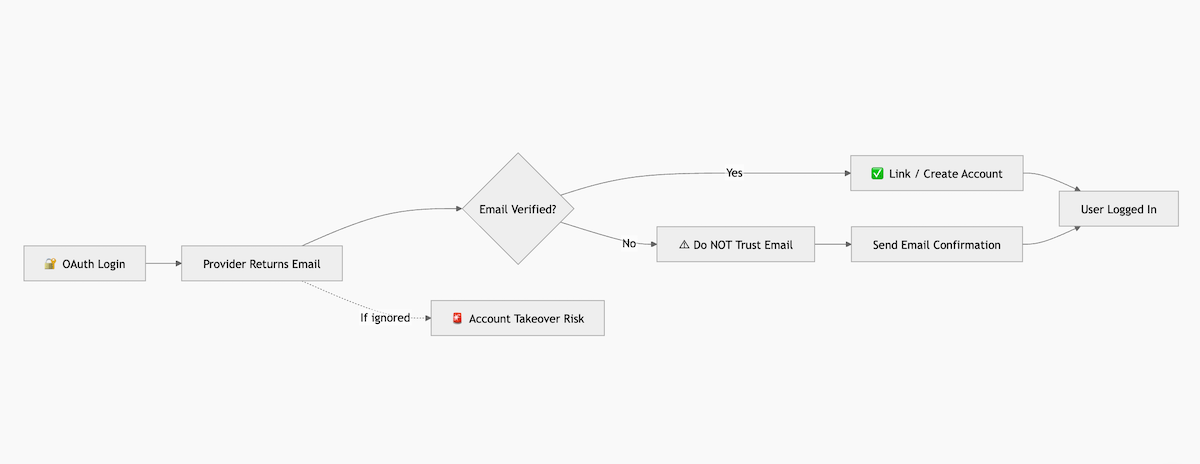
Diagram
flowchart TD
%% Title Node
A["🔐 OAuth Login Attempt"] --> B["User authenticates with OAuth Provider"]

%% Provider Response
B --> C["OAuth Provider returns payload<br/>email: [email protected]<br/>email_verified: ?"]

%% Decision Point
C --> D{Is email_verified == true?}

%% Safe Path
D -->|YES| E["✔ Safe to link / create account"]
E --> F["User session created"]

%% Risk Path
D -->|NO| G["⚠ DO NOT trust email"]
G --> H["Send email confirmation"]
H --> I["User confirms email"]
I --> F

%% Vulnerability Case
C -. If ignored .-> X["🚨 Account Takeover Risk<br/>Attacker uses unverified email<br/>Matches existing user email"]
X --> Y["Victim account compromised"]

%% Styling
classDef safe fill:#d4f8d4,stroke:#2e7d32,stroke-width:2px,color:#1b5e20;
classDef danger fill:#ffe0e0,stroke:#c62828,stroke-width:2px,color:#8e0000;
classDef decision fill:#fff8e1,stroke:#f9a825,stroke-width:2px;

class E,F safe;
class G,X,Y danger;
class D decision;
Conclusion
Never assume OAuth equals email verification. The protocol doesn’t guarantee it, and some major providers don’t even give you the information to make that decision.
If you need verified emails, either check what the provider offers and understand its limitations, or verify emails yourself after OAuth login. The convenience of “Sign in with Facebook” isn’t worth exposing your users to account takeover.
The safer path is simpler: trust no email, verify everything.